Notion MCP server: scoped access for every agent
Notion MCP is the official Model Context Protocol server that Notion hosts at mcp.notion.com. It lets Claude, Claude Code, Codex, Cursor and other MCP clients search, read and update the pages and databases you can already open, after a one-time OAuth sign-in. AIPx connects that server once and gives each agent its own URL with only the Notion tools you allow.
What your agent can do with Notion
The Notion MCP server ships purpose-built tools, not raw REST endpoints, and returns Notion-flavored Markdown. In AIPx, read tools start on Allow and writes on Confirm. Nothing deletes. But notion-update-page can replace a whole page body.
| Tool | What it does | Access | Mode |
|---|---|---|---|
| notion-search | Find and read pages, databases and views (AI search needs Notion AI) | read | Allow |
| notion-ai-search | Find and read pages, databases and views (AI search needs Notion AI) | read | Allow |
| notion-fetch | Find and read pages, databases and views (AI search needs Notion AI) | read | Allow |
| notion-query-data-sources | Query rows and meeting notes; some queries need Business+ | read | Allow |
| notion-query-meeting-notes | Query rows and meeting notes; some queries need Business+ | read | Allow |
| notion-get-comments | Discussions, teamspaces, members with emails | read | Allow |
| notion-get-teams | Discussions, teamspaces, members with emails | read | Allow |
| notion-get-users | Discussions, teamspaces, members with emails | read | Allow |
| notion-create-pages | Create or copy pages | write | Confirm |
| notion-duplicate-page | Create or copy pages | write | Confirm |
| notion-update-page | Change properties or content | write | Confirm |
| notion-create-comment | Comment, attach files, add views | write | Confirm |
| notion-create-attachment | Comment, attach files, add views | write | Confirm |
| notion-create-view | Comment, attach files, add views | write | Confirm |
| notion-move-pages | Restructure the workspace or a schema | write | Hide |
| notion-create-database | Restructure the workspace or a schema | write | Hide |
| notion-update-data-source | Restructure the workspace or a schema | write | Hide |
Blog posts still say 13 or 18 tools. Notion's reference listed 36 on 2026-09-16. Also there: the Notion Skills tools, folders, file uploads up to 20 MiB, async task status and 11 Custom Agent session tools that need Notion AI (hide them). AIPx discovers the live list when you connect. Hide what your Notion plan can't run, or the agent wastes calls on tools that fail.
Capability snapshot: 14 October 2026 · provider source
Connect Notion MCP to Claude, Claude Code, Codex and Cursor
Connecting each client directly means a separate OAuth per client, each seeing all 36 tools. With AIPx as your MCP gateway, you sign in to Notion once, and the Claude Notion integration and the Codex one share a login but not permissions.
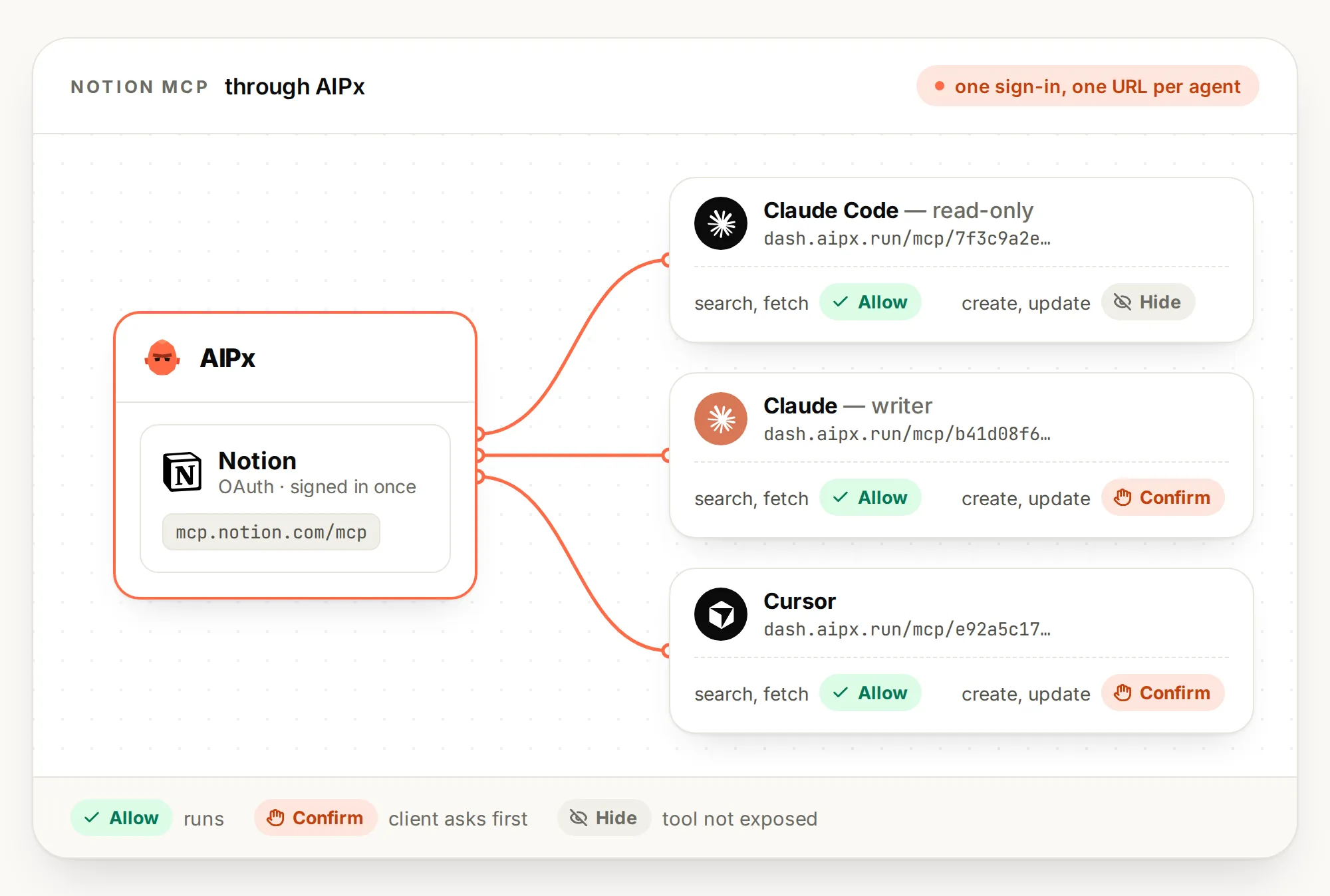
- Integrations: pick Notion and complete OAuth.
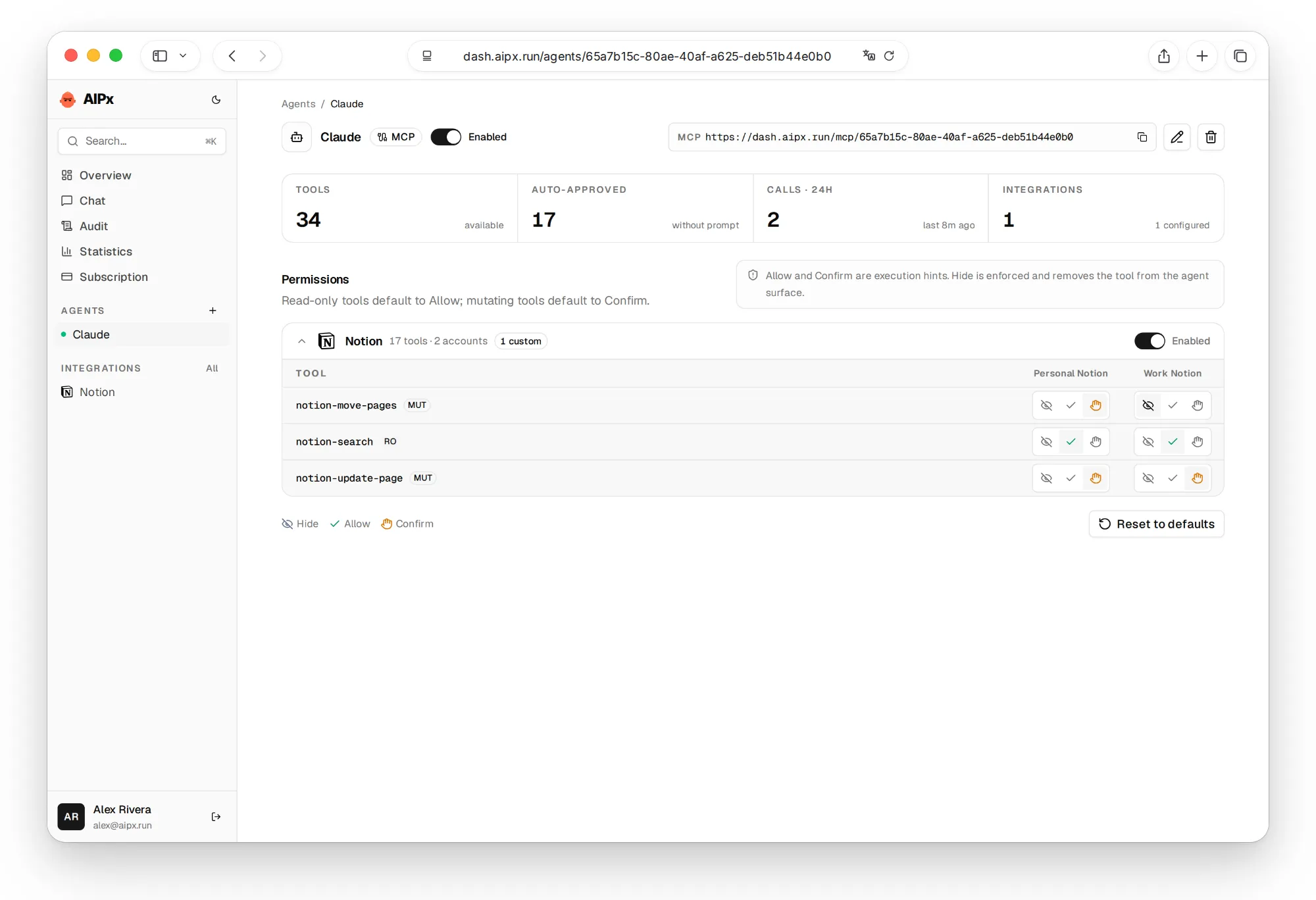
- Your agents → Create agent: choose MCP, turn Notion on, set Allow, Confirm or Hide per tool, save.
- Copy the endpoint,
https://dash.aipx.run/mcp/<agent>.
Notion MCP in Claude Code
claude mcp add --transport http --scope user aip https://dash.aipx.run/mcp/<agent>Then run /mcp, pick the server and authorize in the browser. claude mcp list confirms it. See Claude Code MCP setup.
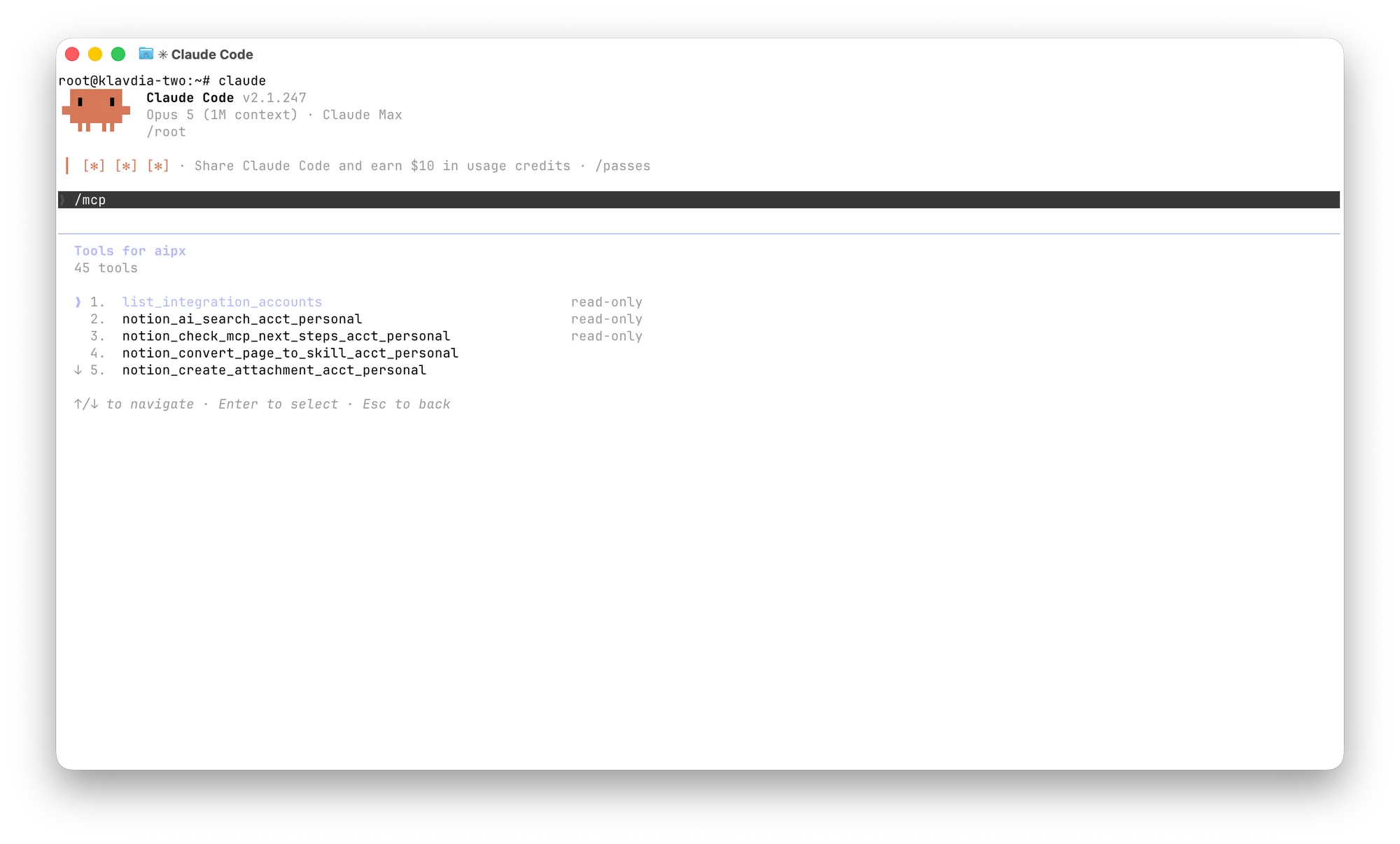
Connect Claude to Notion
On Pro or Max: Customize > Connectors, ”+”, Add custom connector, paste the endpoint, Add. Team and Enterprise owners use Organization settings > Connectors. The free Claude plan allows one custom connector, and through AIPx that slot carries every account your agent has. More in Claude MCP connectors.
Notion MCP in Codex
codex mcp add aip --url https://dash.aipx.run/mcp/<agent>
codex mcp login aip
Login opens OAuth in the browser. See Codex MCP servers.
Notion MCP in Cursor
In .cursor/mcp.json or ~/.cursor/mcp.json:
{
  "mcpServers": {
    "aip-notion": { "url": "https://dash.aipx.run/mcp/<agent>" }
  }
}
Cursor asks before using MCP tools by default. Details in Cursor MCP config.
Connect Notion to ChatGPT
Add the copied AIPx agent URL as a custom MCP app when your ChatGPT account and workspace have developer/custom connector access. Sign in to AIPx and check the allowed Notion tools before a write. Account tier, supported client and workspace administration determine availability; ChatGPT MCP setup covers current restrictions. For other compatible remote clients, see other MCP clients.
Scope Notion MCP per agent
Per Notion’s help page, MCP tools act with your full Notion permissions. Notion’s own client controls are Enterprise-only and never per tool. AIPx sets access at tool × account × agent, so search first and write later, from a different agent.
| Tool group | Research agent (Claude Code) | Docs writer (Claude) | Workspace curator |
|---|---|---|---|
| search, fetch, query | Allow | Allow | Allow |
| create-pages, create-comment | Hide | Confirm | Confirm |
| update-page | Hide | Confirm | Confirm |
| move-pages, create-database, update-data-source | Hide | Hide | Confirm |
| Custom Agent sessions | Hide | Hide | Hide |
Why hide notion-update-page from the researcher? It rewrites the page instead of one block, so “fix one line in the spec” can drop formatting or a teammate’s edit. Reading a spec needs only notion-fetch.
One honest caveat: Confirm is a hint the client must act on, and AIPx doesn’t pause the call. If your client doesn’t prompt, use Hide. More on per-tool MCP permissions.
Use two Notion workspaces with one agent
Connect work and personal accounts in AIPx (Free covers 3). Keep work read-only and allow personal pages behind Confirm. Both land in one audit log. With one workspace and one client, you don’t need a gateway yet.
Notion MCP limits worth knowing
AIPx doesn’t route around these:
- OAuth only, no API keys or headless sign-in (MCP OAuth). Backends can use OpenAPI access for backends, but Notion still runs on your user token.
- Page-level edits, no block-level operations, no delete tool.
notion-search: 30 requests/min. Notion API: 180/min per connection, 600 on Business and Enterprise.- Notion supports only its remote MCP server; the local one may be sunset.
For block-level edits or headless jobs on an integration token, the Notion REST API fits better.
Notion plan and page access still apply. AIPx can’t expand what your Notion user can reach, and some tools need Notion AI or Business+.
Compare direct vendor connections in the MCP servers catalog before adding a gateway to a Notion-only workflow.

What to ask your agent
For how to use Claude with Notion, name the source and the output:
FAQ
What is Notion MCP?
Notion's official hosted MCP server at https://mcp.notion.com/mcp. It uses OAuth and your Notion permissions, and works with Claude, Claude Code, Codex and Cursor. Background: what an MCP server is.
Is the Notion MCP server free?
Yes. Notion does not charge separately for its official MCP server; some tools still depend on your Notion plan or Notion AI. AIPx Free includes 3 active connected accounts and 1 agent; Pro costs $3/month. The AI client's connector access and subscription are separate. See AIPx pricing.
Does Notion MCP need an API key or integration token?
No, it's OAuth only. ntn_ tokens work only in the older local server.
How do I add Notion MCP to Claude Code?
Run claude mcp add --transport http --scope user aip https://dash.aipx.run/mcp/<agent>, then /mcp to authorize. Without AIPx: claude mcp add --transport http notion https://mcp.notion.com/mcp.
Can I stop an agent from editing or moving Notion pages?
Yes. Set notion-update-page to Confirm and notion-move-pages to Hide in AIPx; Notion has no per-tool switch. Confirm works only if your client shows the prompt.