Linear MCP server: scoped access for every agent
Linear MCP is Linear's official remote MCP server at https://mcp.linear.app/mcp. It lets Claude, Claude Code, Codex, Cursor and other MCP clients find, create and update Linear issues, projects, comments and documents after an OAuth login. AIPx connects that server once and gives each agent its own URL with only the Linear tools you allow, so a triage agent can read everything while only a delivery agent can call save_issue.
What your agent can do with Linear
Linear MCP tools split into reads (list_*, get_*) and saves (save_*). Reads stay on Allow. Saves change shared objects, so AIPx puts them on Confirm by default, and you can hide them from research-only agents.
| Tool | What it does | Access | Mode |
|---|---|---|---|
| list_issues | Search and filter issues | read | Allow |
| get_issue | One issue with relations and documents | read | Allow |
| save_issue | Create or update an issue | write | Confirm |
| list_projects | List projects by team, state, lead | read | Allow |
| get_project | One project with status | read | Allow |
| save_project | Create or update a project | write | Confirm |
| list_comments | Comments on an issue, document or project | read | Allow |
| save_comment | Create or update a comment | write | Confirm |
| list_documents | Search documents | read | Allow |
| get_document | A document as Markdown | read | Allow |
| save_document | Create or update a document | write | Confirm |
| list_cycles | Team cycles and progress | read | Allow |
| list_teams | Teams the user can access | read | Allow |
This is a selection: Linear keeps adding tools, and AIPx shows whatever the server exposes once your account is connected.
Capability snapshot: 14 October 2026 · provider source
Linear MCP server: official vs through AIPx
Both columns use the same Model Context Protocol server. AIPx proxies Linear’s own server, not a wrapper over the API. For direct setup, the Linear MCP server documentation is the source.
| Linear MCP directly | Through AIPx | |
|---|---|---|
| Login | OAuth in each client | Once in AIPx |
| Read-only | /mcp/readonly, whole client | Per tool, per agent |
| Multiple workspaces | MCP_REMOTE_CONFIG_DIR per workspace | Several accounts in one connector |
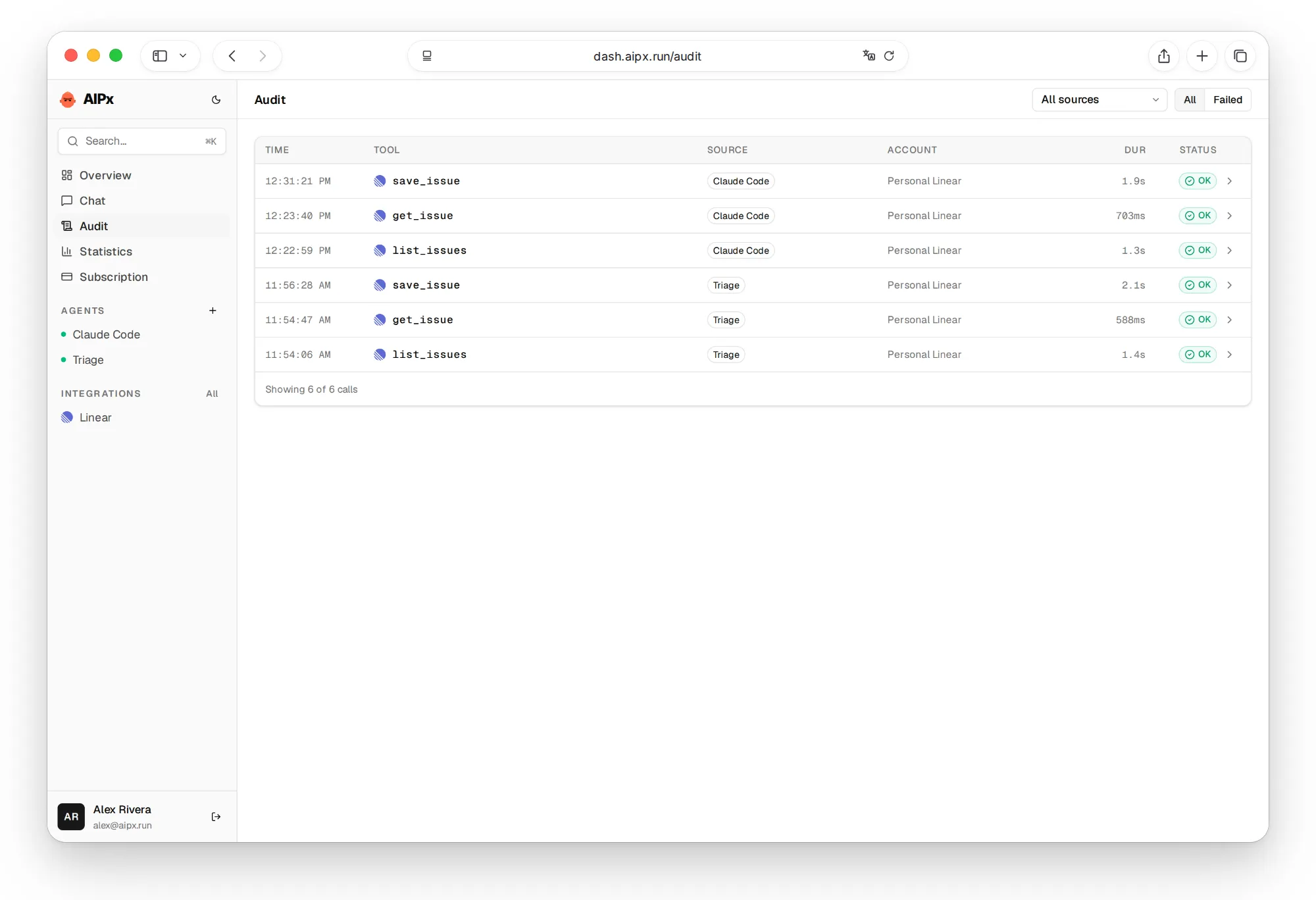
| Audit | No shared log | One audit log |
| Price | Free | Free for 3 accounts, Pro $3/month |
Honestly, if you run one client against one Linear workspace, Linear’s own command or the read-only endpoint is enough, and it’s free. AIPx pays off at the second client or second workspace. The same MCP gateway covers all AIPx integrations, including Confluence MCP and the Atlassian MCP server.
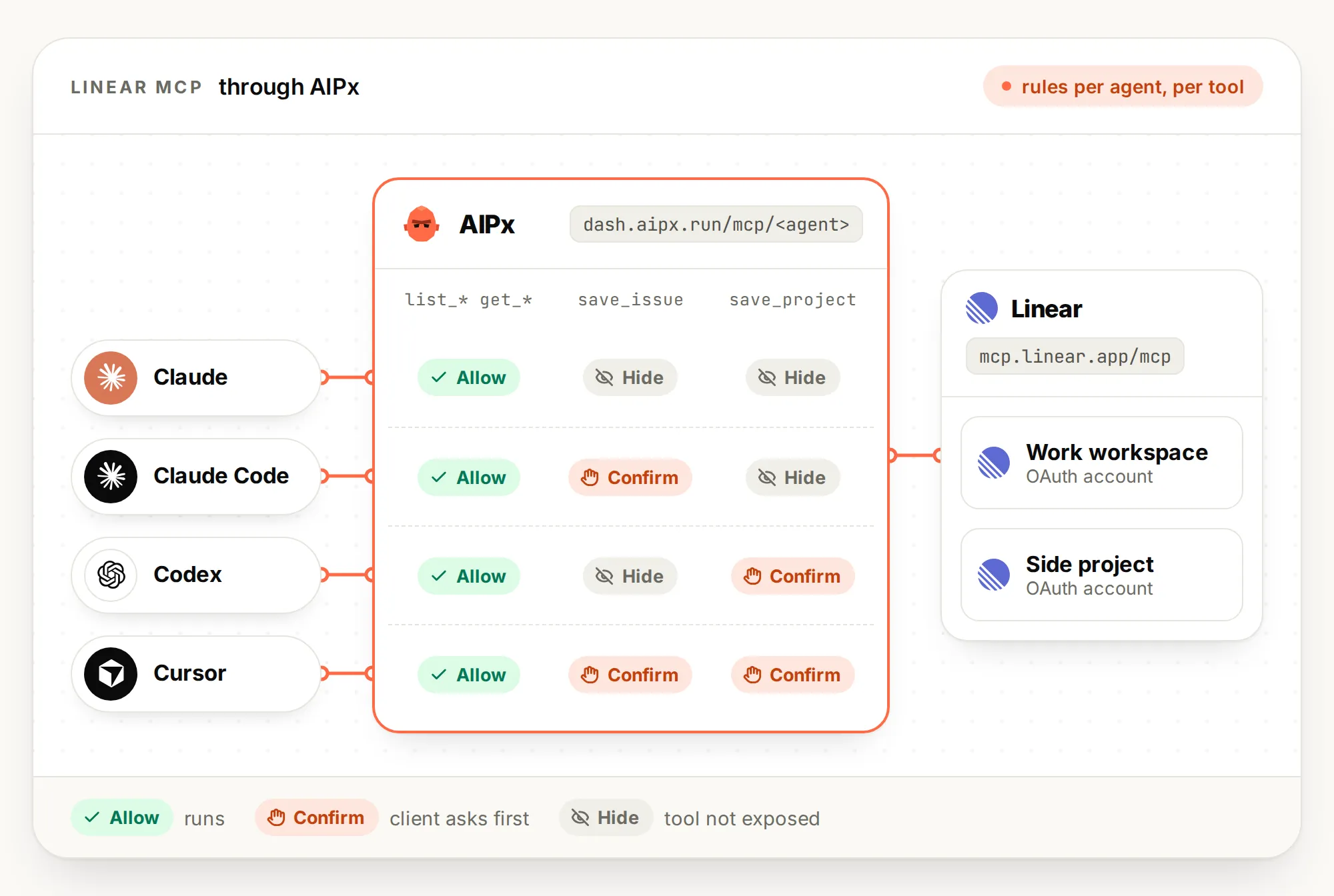
Connect Linear MCP to Claude, Claude Code, Codex and Cursor
Set up Linear once in dash.aipx.run:
- Open Integrations, pick Linear and finish the MCP OAuth login.
- In Your agents, create an MCP agent, turn on Linear, set tool modes, Save.
- Copy the endpoint, e.g.
https://dash.aipx.run/mcp/<agent>.
Clients sign in to AIPx through OAuth DCR, so no Linear token lands in a client config.
Linear MCP in Claude Code
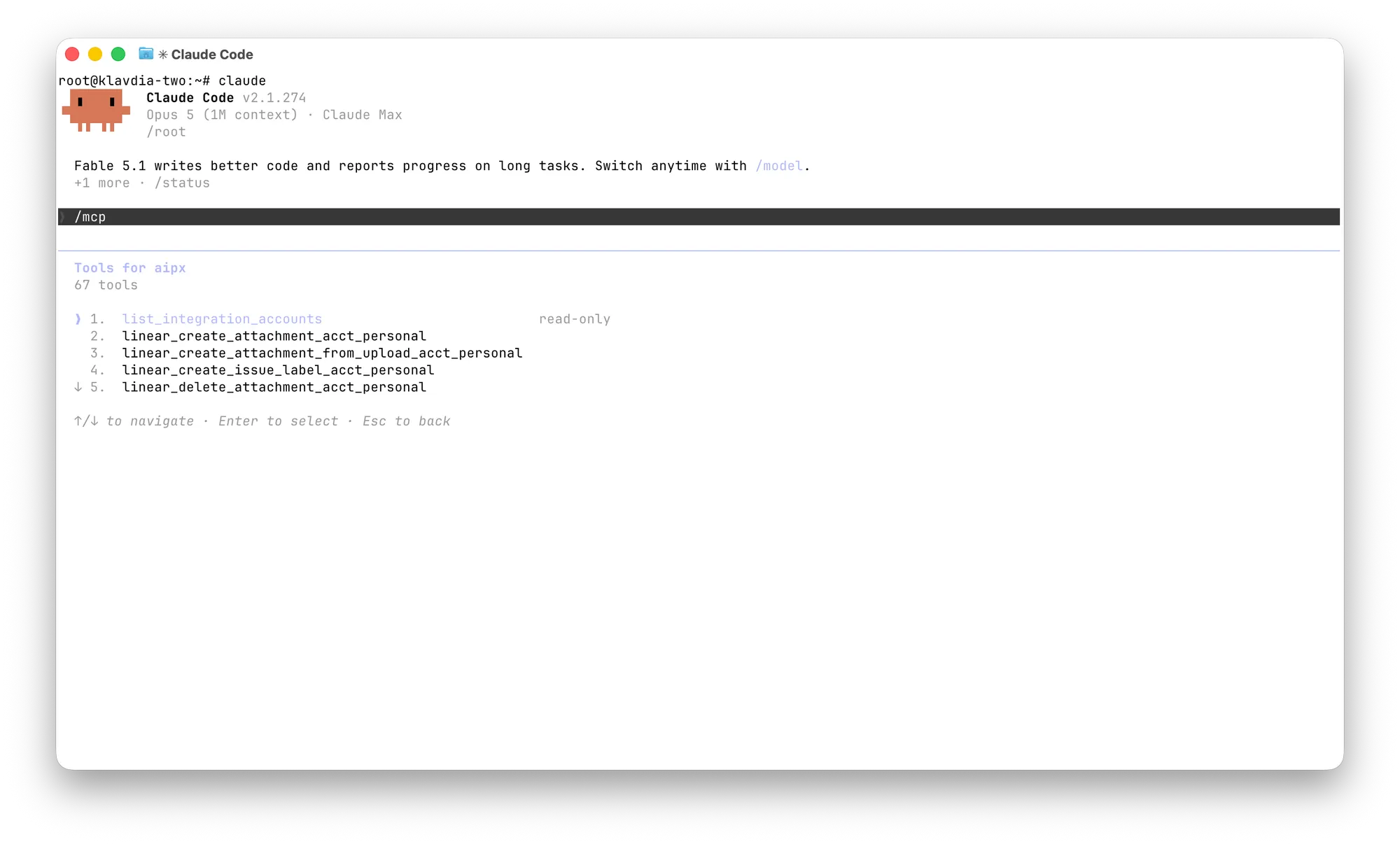
claude mcp add --transport http --scope user aip https://dash.aipx.run/mcp/<agent>Run /mcp, pick aip, authorize in the browser, then check claude mcp list. Connect Supabase MCP later and it appears behind the same aip entry, like any of the best MCP servers. More in the Claude Code MCP setup guide.
Connect Claude to Linear
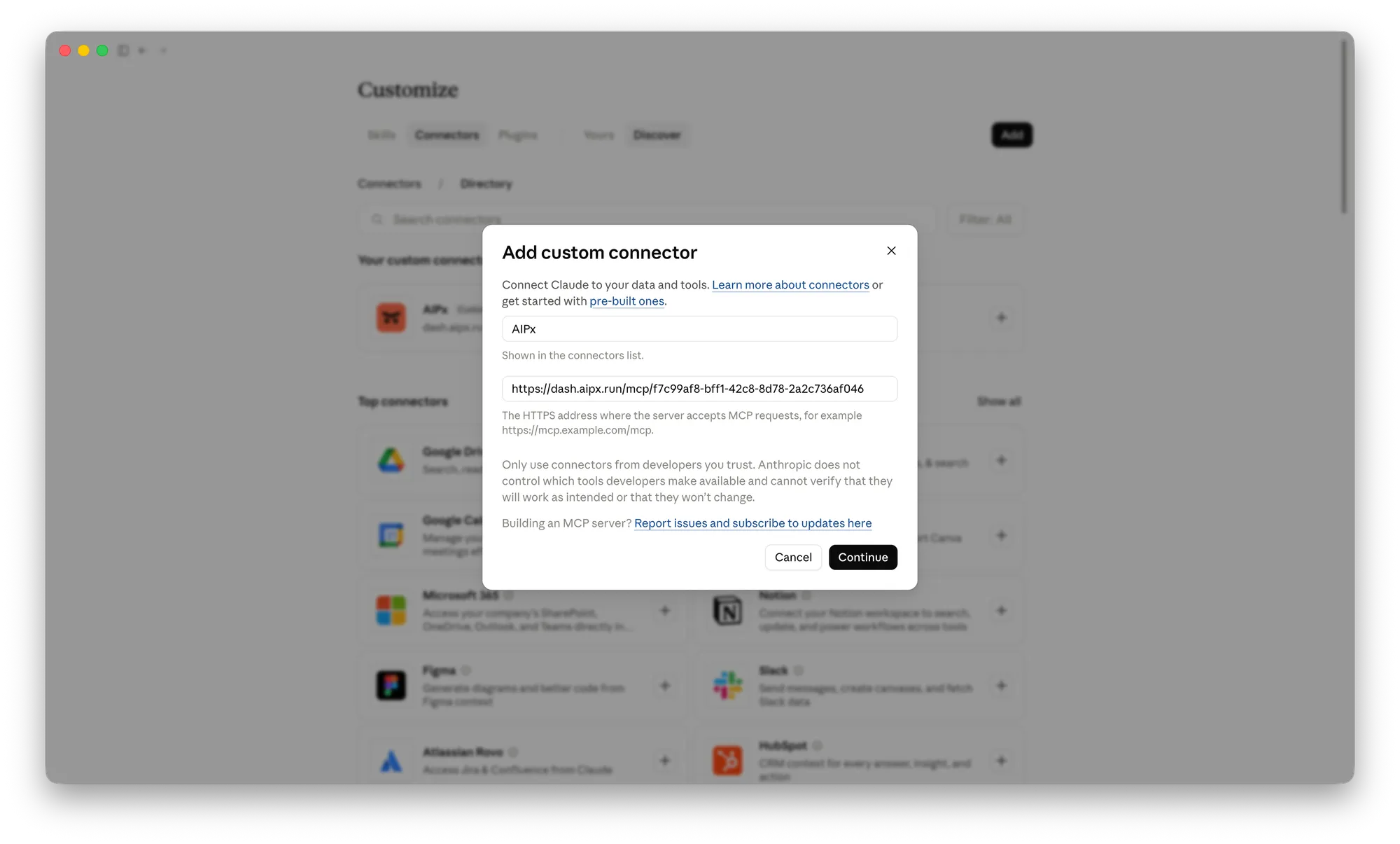
On Pro or Max: Customize > Connectors > ”+” > Add custom connector, paste the URL, Add. On Team and Enterprise an Owner does it in Organization settings. The Claude Free plan allows one custom connector, and one AIPx URL fills it with Linear plus your other accounts. See Claude MCP connectors and Claude Desktop MCP.
Linear MCP in Codex
codex mcp add aip --url https://dash.aipx.run/mcp/<agent>
codex mcp login aip
Check with codex mcp list. Details in Codex MCP.
Linear MCP in Cursor
Add to ~/.cursor/mcp.json (or .cursor/mcp.json per project), and Cursor prompts you to sign in. See Cursor MCP.
{
  "mcpServers": {
    "aip": { "url": "https://dash.aipx.run/mcp/<agent>" }
  }
}
No tools showing? Check that the agent is enabled, Linear is turned on for it, changes are saved and tools aren’t on Hide. A backend can use the same agent through key-protected OpenAPI access.
Scope Linear MCP tools per agent
One Linear account, three jobs:
| Tools | Triage (Claude) | Delivery (Claude Code) | Planning (Codex) |
|---|---|---|---|
list_*, get_* | Allow | Allow | Allow |
save_issue | Hide | Confirm | Hide |
save_comment | Confirm | Allow | Confirm |
save_project, save_document | Hide | Hide | Confirm |
delete_*, merge_diff | Hide | Hide | Hide |
Hide removes a tool entirely, which also saves context: in Fiberplane’s test Linear’s tool definitions took about 17.3k tokens.
The limitation: in external clients, Confirm is a hint the client has to respect. AIPx doesn’t pause the call itself, and real inline confirmation exists only in AIPx’s built-in chat. For anything risky, use Hide. A cautious start is to keep a new agent on reads only and add saves once the audit log shows what it needs. Rules live in the AIPx control room; per-tool MCP permissions work the same for Jira MCP. AIPx uses Linear’s standard read-write endpoint and can’t exceed your Linear user’s rights.
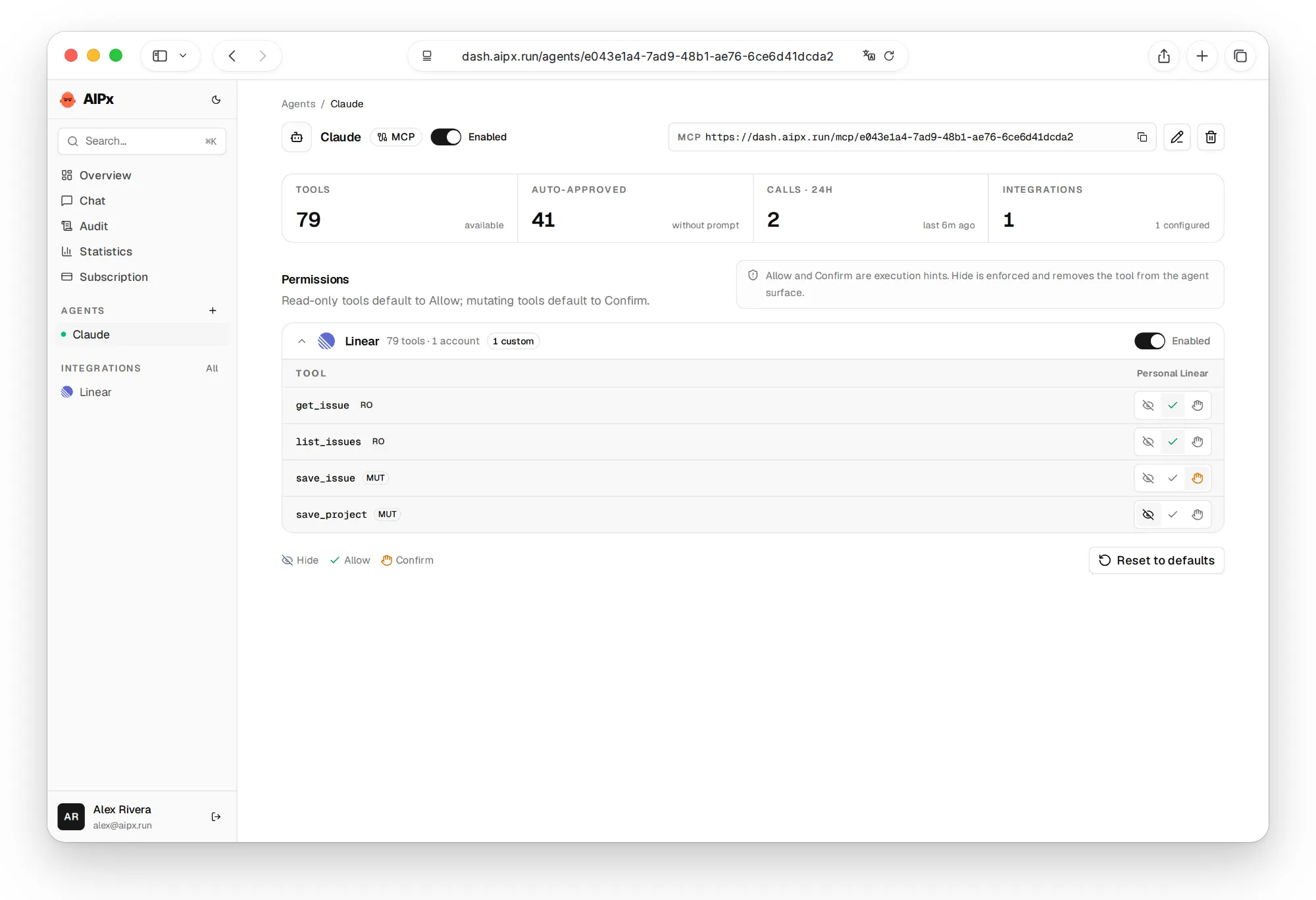
Use two Linear workspaces at once
Work and a side project often live in separate Linear workspaces. Linear’s docs suggest a separate MCP_REMOTE_CONFIG_DIR for each. In AIPx they’re two accounts in one connector with their own modes: save_issue on Allow for the side project, Confirm for work, one URL. Both fit in the Free plan, see AIPx pricing.
Use Linear MCP in Claude Code without issue noise
An agent with save_issue and no reads will file duplicates of bugs already in the backlog. Put the order in its instructions: list_issues by keyword, get_issue on the parent, then save_issue on Confirm. Keep the plan in a Linear document, and link sources from Sentry MCP, Notion MCP or PostHog MCP instead of pasting them.

What to ask your agent
Name a team or project, a time window, and whether you want analysis or a change.
FAQ
What is Linear MCP?
Linear MCP is Linear's official remote MCP server, announced in May 2025 and hosted at https://mcp.linear.app/mcp over Streamable HTTP. After an OAuth login, the Linear app MCP lets an AI client read and change issues, projects, comments and documents.
Is there an official Linear MCP server?
Yes, Linear builds and hosts it, with docs at linear.app/docs/mcp. Third-party servers exist, such as the archived jerhadf/linear-mcp-server. AIPx connects to the official one.
How do I add Linear MCP to Claude Code?
Directly: claude mcp add --transport http linear-server https://mcp.linear.app/mcp, then /mcp to log in. Through AIPx, use your agent URL instead, and Claude Code gets only the Linear tools you allowed.
Can I use a Linear API key instead of OAuth?
Yes. Linear's server accepts Authorization: Bearer with a Linear API key, and a key with only Read permission is read-only. AIPx connects through OAuth, so no key sits in your clients.
Can Linear MCP be read-only?
Yes, via /mcp/readonly or the read scope, but that covers the whole client. AIPx hides save_* tools or puts them on Confirm per agent instead.