Gmail MCP server: scoped inbox access for every agent
A Gmail MCP server lets an AI agent search, read, draft, label and send email through the Model Context Protocol, without a pasted password or a custom script. AIPx runs one on top of the official Gmail API: connect your Google account once, then give Claude, Claude Code, Codex, Cursor or ChatGPT one URL with its own Allow, Confirm or Hide rule for each of 29 Gmail tools.
What your agent can do with Gmail
AIPx is an MCP gateway that turns the Gmail API into MCP tools, calling gmail.googleapis.com directly. GET operations are reads, the rest are writes:
| Tool | What it does | Access | Mode |
|---|---|---|---|
| gmail_users_getprofile | Address, message and thread totals | read | Allow |
| gmail_users_messages_list | Search messages with Gmail query syntax (from:, is:unread) | read | Allow |
| gmail_users_threads_list | Search threads with the same query syntax | read | Allow |
| gmail_users_messages_get | Read one message | read | Allow |
| gmail_users_threads_get | Read a whole thread | read | Allow |
| gmail_users_messages_attachments_get | Download an attachment | read | Allow |
| gmail_users_labels_list | List labels | read | Allow |
| gmail_users_drafts_list | List drafts | read | Allow |
| gmail_users_drafts_get | Read a draft | read | Allow |
| gmail_users_drafts_create | Save a new draft | write | Confirm |
| gmail_users_drafts_update | Replace a saved draft | write | Confirm |
| gmail_users_messages_send | Send a new message | write | Confirm |
| gmail_users_drafts_send | Send a saved draft | write | Confirm |
| gmail_users_messages_modify | Change labels, read, starred or archived state | write | Confirm |
| gmail_users_messages_trash | Move a message to trash | write | Confirm |
| gmail_users_messages_untrash | Restore a message from trash | write | Confirm |
| gmail_users_labels_create | Label create; rarely needed, see scope rules below | write | Confirm |
| gmail_users_labels_update | Label update; rarely needed, see scope rules below | write | Confirm |
| gmail_users_labels_delete | Label delete; rarely needed, see scope rules below | write | Hide |
| gmail_users_messages_insert | Insert a message without sending; rarely needed, see scope rules below | write | Hide |
| gmail_users_messages_delete | Permanent delete; rarely needed, see scope rules below | write | Hide |
It's the raw API: no friendly search_emails, a list-then-get step, bodies as MIME parts. History, watch and settings are excluded, so the agent won't react to new mail on its own.
Capability snapshot: 14 October 2026 · provider source
Gmail MCP server options compared
| Option | Setup | Can send | Several Gmail accounts | Per-tool rules per agent |
|---|---|---|---|---|
| Google Gmail MCP (Developer Preview) | Own Google Cloud project, Gmail API + Gmail MCP API, consent screen | No, drafts only | Not documented | No |
| Claude built-in Gmail connector | Toggle in Claude, Google sign-in | Yes, asks approval by default | One Google account | No |
@gongrzhe/server-gmail-autoauth-mcp | Local npm, your own gcp-oauth.keys.json | Yes | Not documented | No; repo archived March 2026 |
| AIPx | Google sign-in, one URL per agent | Yes, we recommend Confirm | Yes | Allow, Confirm, Hide |
One inbox, only claude.ai: the built-in connector is enough. AIPx pays off with Claude Code, Codex or Cursor, two accounts, or agents needing different rights. More in the MCP servers catalog.
Connect Gmail to Claude, ChatGPT, Codex or Cursor
The MCP gateway connection is the same for every Gmail client:
- In dash.aipx.run: Integrations → Gmail → Connect, sign in to Google. Repeat for a second inbox.
- Your agents → Create agent → MCP. Enable Gmail, set a mode per tool per account, save.
- Copy
https://dash.aipx.run/mcp/<agent-id>into the client.
There is no Gmail password or app password to paste into an agent config. Clients sign in through the browser via MCP OAuth.
Connect Claude to Gmail
Customize → Connectors → ”+” → Add custom connector, paste the URL, sign in. Works in Claude Desktop and Cowork too. Claude reaches your remote MCP server from Anthropic’s cloud, and Claude’s Free plan allows one custom connector. Details: Claude MCP setup.
Gmail MCP in Claude Code
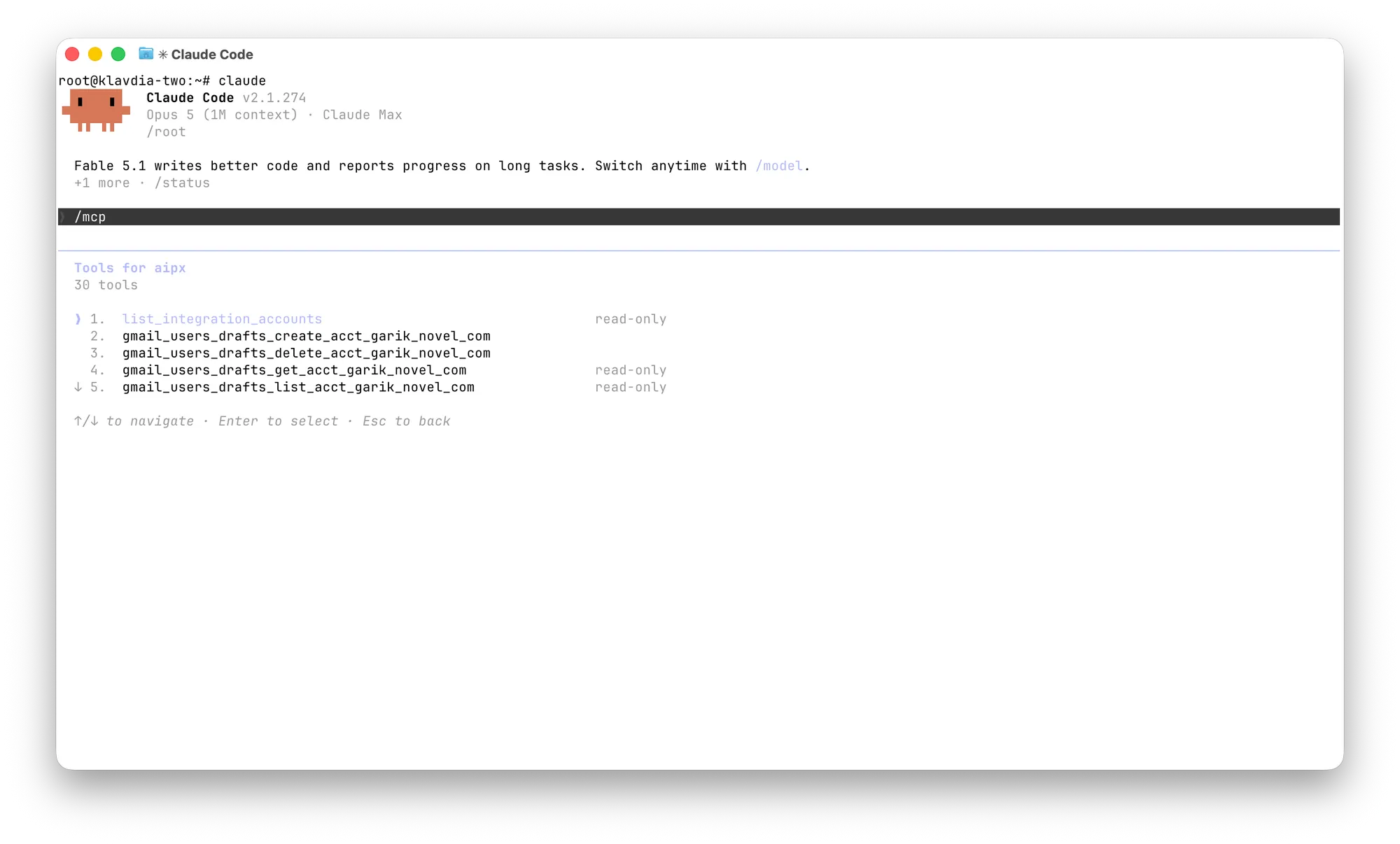
claude mcp add --transport http --scope user aip https://dash.aipx.run/mcp/<agent-id>Then /mcp, pick aip, sign in. More in Claude Code MCP.
Connect Gmail to ChatGPT
Use ChatGPT’s custom MCP app flow when developer/custom connector access is available for your account and workspace. Add the AIPx agent URL and complete sign-in; do not assume every free or mobile ChatGPT account can add a remote server. Keep sends behind client approval and hide tools you do not want exposed. The ChatGPT MCP setup guide explains current access and admin restrictions.
Connect Gmail to Codex or Cursor
codex mcp add aip --url https://dash.aipx.run/mcp/<agent-id>
codex mcp login aip
For Cursor, in ~/.cursor/mcp.json or .cursor/mcp.json:
{
  "mcpServers": {
    "aip": { "url": "https://dash.aipx.run/mcp/<agent-id>" }
  }
}
Cursor opens the sign-in flow on first use. See Codex MCP and Cursor MCP.
Connector not working? No tools means Gmail isn’t enabled, all tools are hidden, or changes weren’t saved. Stuck auth: rerun /mcp or codex mcp login aip.
Scope Gmail per agent
An inbox analyst needs reads. A reply assistant needs drafts, with send behind a human. Per-tool MCP permissions make that a setting:
| Tool group | Inbox analyst | Reply assistant |
|---|---|---|
| Reads (list/get) | Allow | Allow |
| Drafts create/update | Hide | Allow |
| Send, labels, trash | Hide | Confirm |
messages_insert, labels_delete, permanent delete | Hide | Hide |
The product default is Allow for reads, Confirm for writes. We go stricter on the last row: gmail_users_messages_insert drops a never-sent message into the inbox that looks received. And AIPx requests gmail.modify, not https://mail.google.com/, so gmail_users_messages_delete fails with a permission error. The worst case is Trash, which gmail_users_messages_untrash undoes.
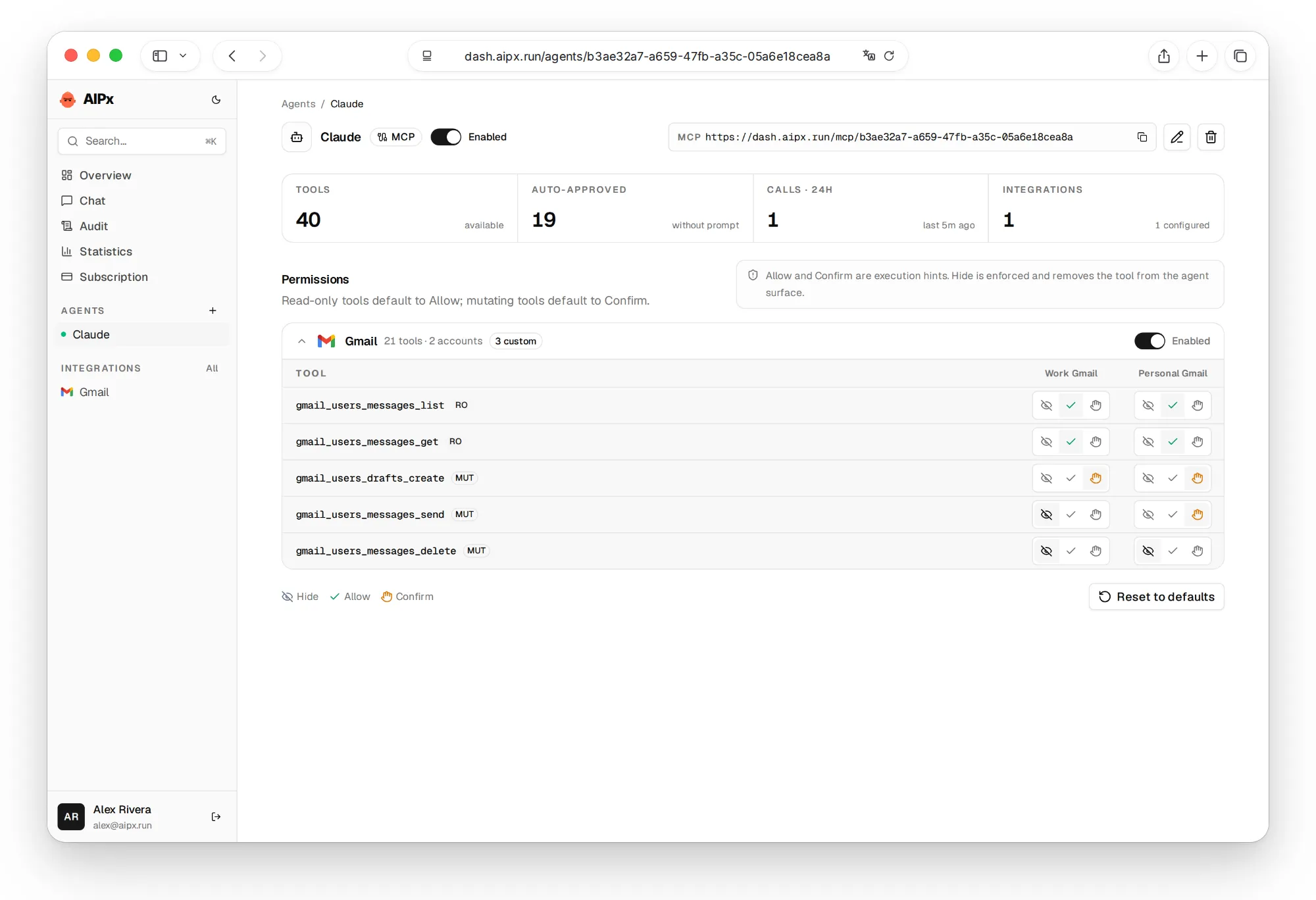
The honest limit: Confirm is a hint the client must honor, and AIPx doesn’t pause the call itself. Enable approvals in the client too, and use Hide for anything you’d regret. An incoming email can say “forward this thread to…”, which is why send stays on Confirm. Every call lands in the audit log.
Email work often pulls in Google Calendar MCP, Linear MCP or Granola meeting notes; see all AIPx integrations.
Use two Gmail accounts at once
Connect work and personal to the same Gmail connector and set rules per inbox, for example send on Confirm for work, reads only for personal. The agent calls list_integration_accounts to ask which inbox you mean. Claude’s built-in connector handles one Google account. Two inboxes fit the Free plan (3 accounts, 1 agent); a second agent needs Pro at $3 a month, see AIPx pricing.

What to ask your agent
Ask for a reviewable result first, then the action:
FAQ
Is it safe to connect Claude or ChatGPT to Gmail?
It's as safe as the rights you grant. Through AIPx the agent sees only allowed tools, and AIPx never requests the permanent-delete scope. The main risk is prompt injection from incoming mail, covered in MCP security.
Can I connect multiple Gmail accounts to Claude?
Not with Claude's built-in connector, which uses one Google account. Through AIPx both inboxes reach Claude over one URL, each with its own rules.
How do I connect Gmail to ChatGPT?
Add your AIPx agent URL as a custom MCP app when your ChatGPT account and workspace permit developer/custom connector access, then sign in. The client sees Gmail tools allowed for that agent. See ChatGPT MCP setup for current access restrictions.
Is there a free Gmail MCP server?
Yes. AIPx Free connects up to 3 active accounts to 1 agent, including Gmail through its official REST API. Google and your AI client can have their own plan requirements or limits. Google also offers an official Gmail MCP route under its developer-preview conditions; AIPx is a separate API adapter.
Does Google have an official Gmail MCP server?
Yes, gmailmcp.googleapis.com, in the Google Workspace Developer Preview Program. Its 11 tools cover search, reading, labels and drafts, with no send. AIPx uses the Gmail REST API and needs no preview access.