PostHog MCP server: scoped access for every agent
PostHog MCP is PostHog's official Model Context Protocol server, hosted at https://mcp.posthog.com/mcp. It lets Claude, Claude Code, Codex, Cursor and other MCP clients query trends, funnels, errors and logs, and create feature flags, experiments and surveys from a prompt. AIPx connects it once through PostHog OAuth and gives each agent its own URL, where the whole PostHog connection is set to Allow, Confirm or Hide.
What your agent can do with PostHog
The catalog has more than 900 commands. Through AIPx, PostHog runs in CLI mode: the agent sees one tool, posthog_exec, and looks up the command it needs. AIPx's OAuth scopes cover about 190 of them.
| Tool | What it does | Access | Mode |
|---|---|---|---|
| exec | One PostHog MCP tool (shown to agents as posthog_exec). Runs CLI-style commands: tools, search, info, schema, and call for queries, SQL, error tracking, logs, flags, experiments, surveys, and dashboards. | write | Confirm |
Capability snapshot: 14 October 2026 · provider source
posthog_exec  {"command": "search funnel"}
posthog_exec  {"command": "info query-funnel"}
posthog_exec  {"command": "call query-funnel {...}"}
That’s 2 to 4 calls per question, but no 190 MCP tools loaded into every session.
| Group | Example commands | Access |
|---|---|---|
| Trends, funnels, SQL | read-data-schema, query-funnel, execute-sql | read |
| Error tracking, logs | query-error-tracking-issues-list, query-logs | read, write |
| Web analytics | query-web-vitals | read |
| Insights, dashboards | insight-create, dashboard-delete | read, write, destructive |
| Feature flags | update-feature-flag, delete-feature-flag | read, write, destructive |
| Experiments, surveys | experiment-launch, survey-create | read, write, destructive |
| Not through AIPx | session replay, persons, cohorts, notebooks | no scope |
Error tracking pairs with Sentry MCP; see PostHog and other MCP integrations.
Connect PostHog MCP to Claude, Claude Code, Codex or Cursor
- In
dash.aipx.run, open Integrations → PostHog and sign in via MCP OAuth. No API key; the US or EU region follows your account. - Create an MCP agent, turn on PostHog, pick a mode per account, save.
- Copy
https://dash.aipx.run/mcp/your-agent.
Connect PostHog to Claude
Customize → Connectors → Add custom connector, paste the URL, sign in. Claude Free allows one custom connector, so one AIPx URL is how PostHog and Sentry share it. See Claude MCP and Claude Desktop MCP setup.
Connect PostHog to Claude Code
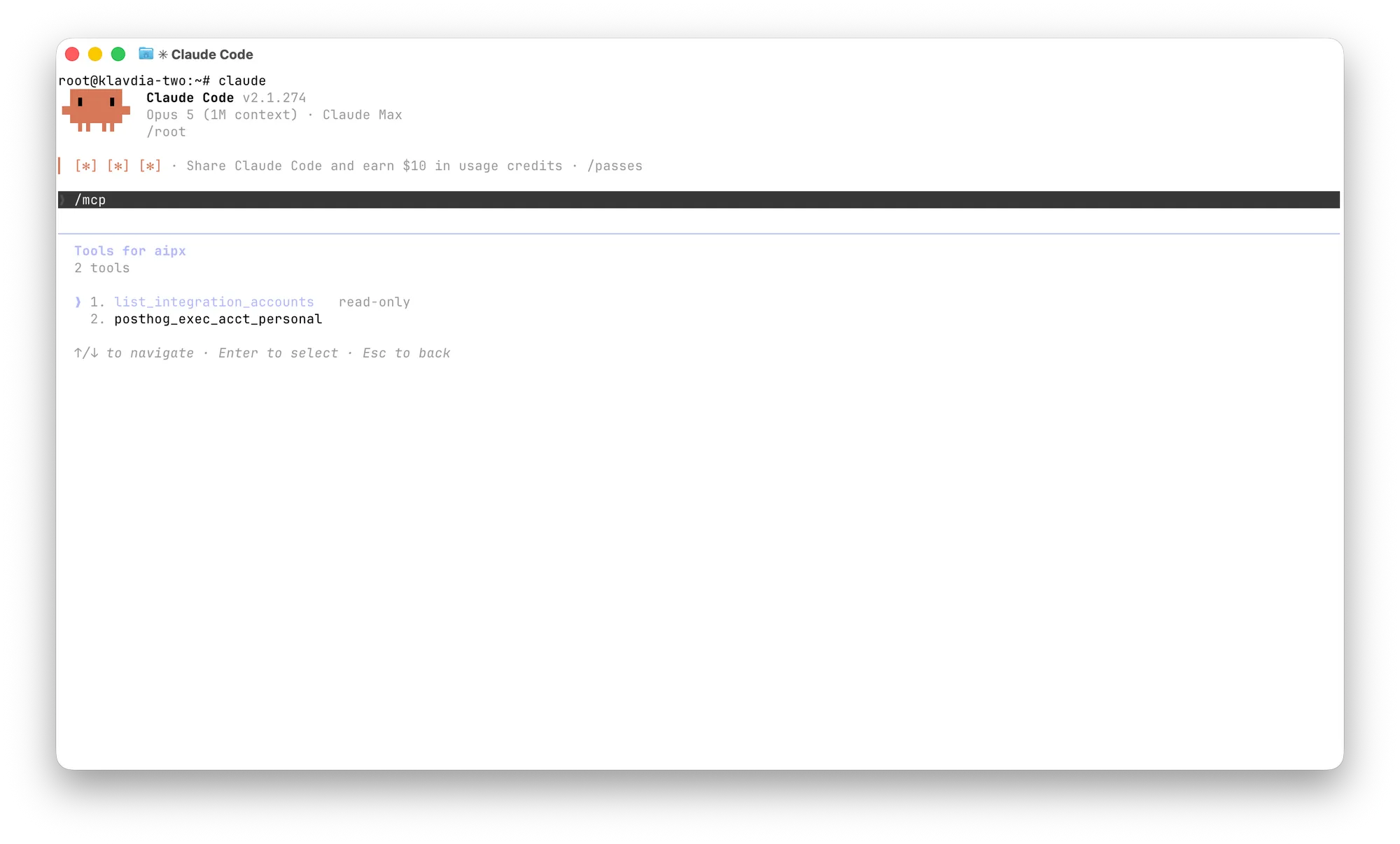
claude mcp add --transport http --scope user aip https://dash.aipx.run/mcp/your-agentThen /mcp → aip → sign in. PostHog’s native claude mcp add gives the same CLI mode. The difference is where the token lives and who else sees that PostHog. See Claude Code MCP.
Connect PostHog to Codex or Cursor
codex mcp add aip --url https://dash.aipx.run/mcp/your-agent
codex mcp login aip
{ "mcpServers": { "aip": { "url": "https://dash.aipx.run/mcp/your-agent" } } }The JSON goes in ~/.cursor/mcp.json. Connected directly, PostHog gives Cursor one tool per command; through AIPx, Cursor sees posthog_exec like everyone else. See Codex MCP and Cursor MCP.
No tools? Check PostHog is enabled, saved and not on Hide. “Missing the required scope(s)” means the command is outside AIPx’s scopes; reconnecting won’t help.
Scope PostHog per agent: one switch per connection
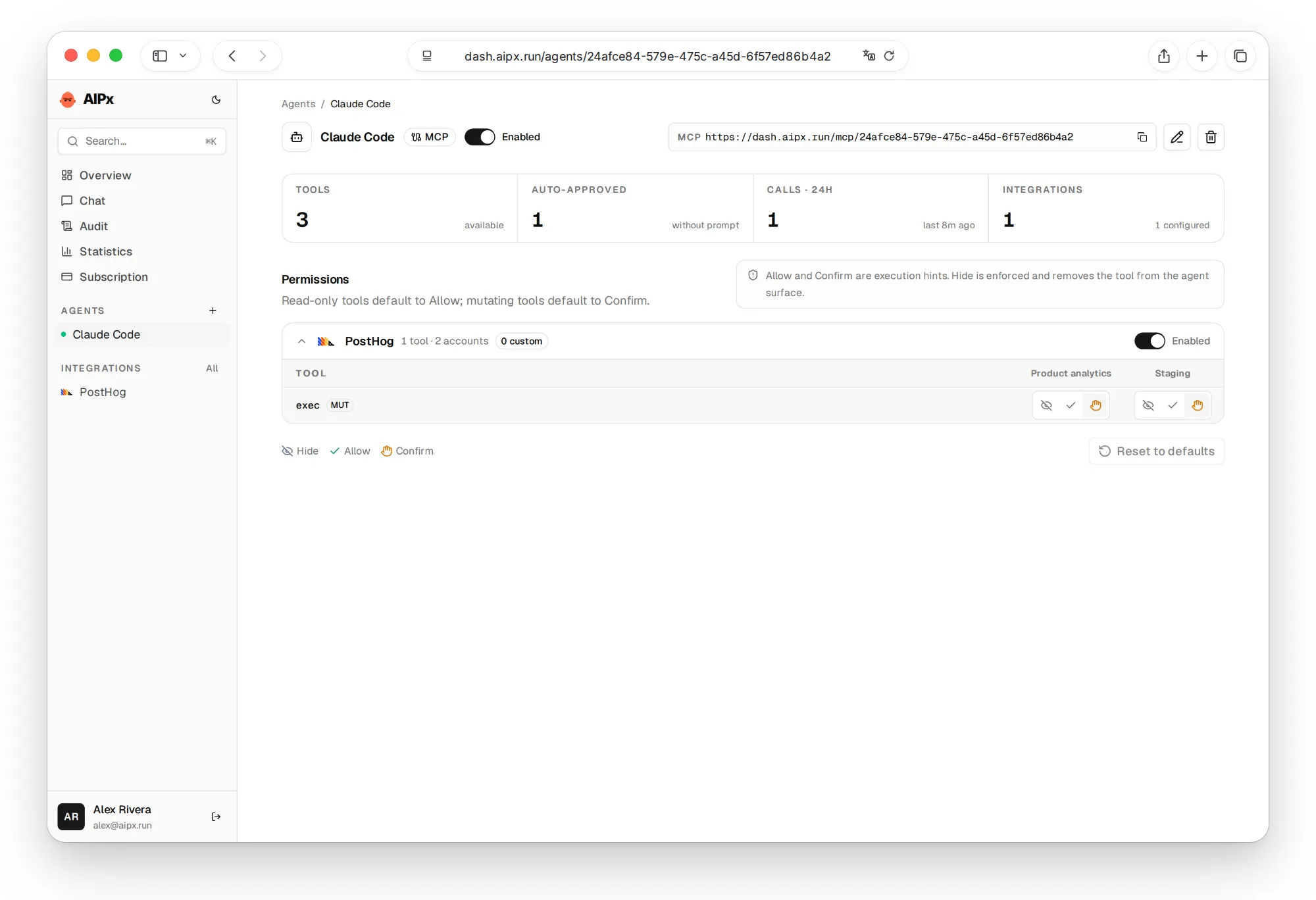
The main limitation, up front: in AIPx PostHog is one tool. You can’t allow reads and block writes inside it.
Mode on posthog_exec | What the agent gets |
|---|---|
| Allow | every command without approval, delete-feature-flag included |
| Confirm (default) | approval on every call, even search; the command string is visible |
| Hide | no PostHog |
That’s about four approvals per question, and approving becomes a reflex. Still, call update-feature-flag {"id": ..., "rollout_percentage": 0} is the line not to click through.
So split by agent, not by tool (MCP permissions per agent). An analytics agent in Claude Code keeps PostHog on Confirm, a release agent in Codex changes flags, a Cursor agent on a client repo gets Hide. Free has one agent; a second needs Pro at $3/month (AIPx pricing).
Confirm is enforced by the client, not AIPx. The hosted server runs destructive commands without --confirm, and PostHog warns about prompt injection. If an agent reads tickets or user feedback, keep PostHog off Allow (MCP security).
PostHog MCP with AIPx vs the native server
| Need | Native PostHog MCP | Through AIPx |
|---|---|---|
| Read-only or filtered tools | ?readonly=true, ?features=, ?tools= | No; use Confirm or Hide |
| Different access per agent | Config per client | Agent with its own mode |
| Several accounts | One connection each | One connector |
| Shared call log | No | Yes, with Sentry and Linear |
| Price | Free | Free: 3 accounts, 1 agent; Pro $3/month |
Honestly, for read-only PostHog in one client, the native server with readonly=true is the better fit (PostHog MCP FAQ). AIPx earns its place when PostHog sits next to Linear MCP and others from the MCP server directory behind one MCP gateway URL.
Use two PostHog projects or accounts
A work account and a pet project, often in different regions, go into one connector. The agent sees posthog_exec_acct_<label> per account, each with its own mode: work on Hide, pet on Allow.

What to ask your agent
Ask the agent to name events, filters, period and aggregation, and to run read-data-schema first: mix up project_created and project created, and the funnel confidently reports 0%. State the boundary in the prompt.
FAQ
What is PostHog MCP?
PostHog's official remote MCP server at https://mcp.posthog.com/mcp. It gives AI clients analytics, SQL, error tracking, logs, flags, experiments and surveys, by default through one CLI-style exec tool. Connecting is free.
Where are the official PostHog MCP server docs?
At posthog.com/docs/model-context-protocol, with a tools reference and a FAQ on read-only mode, API keys and regions.
How do I use PostHog MCP with Claude Code?
Natively, claude mcp add --transport http posthog https://mcp.posthog.com/mcp -s user. Through AIPx, add your agent URL and sign in. Claude Code then sees posthog_exec.
How do I monitor performance through PostHog MCP?
Ask for query-web-vitals, query-trends, query-error-tracking-issues-list after a release, or query-logs. All are reads. PostHog's "MCP Analytics" is a different product that monitors your own MCP server.
Can an agent change feature flags through PostHog MCP?
Yes, including delete-feature-flag, without --confirm. In AIPx that runs through the same posthog_exec as queries, so keep it on Confirm or use a separate agent.
Can I connect more than one PostHog account?
Natively, one connection per account. In AIPx several accounts share one connector, with a mode per account and agent. Free covers 3 accounts.