What is an MCP server?
By AIPx team · Published 2026-10-14 · Updated 2026-10-14
An MCP server is a program or remote service that exposes tools, data resources and reusable prompts through the Model Context Protocol. An AI application connects to it through an MCP client and decides which capabilities to use. The server does not need to contain a language model: it can be a small adapter around an existing API.
This guide explains the roles and practical boundaries using official documentation checked on October 14, 2026. Protocol revision and product support are separate questions. A service described as MCP-compatible may implement an earlier revision or only some optional capabilities.
What is an MCP server
Consider an assistant that needs to inspect a software issue. The model can suggest looking it up, but it cannot directly authenticate to your issue tracker or execute the API operation. The host needs an executor. A server supplies a named operation with a description, an input schema and a result format that the host can use.
The existing service remains underneath. An issue tracker still stores the issue, applies its account permissions and decides whether an update succeeds. The adapter translates a protocol request into the service operation and returns a result. That translation is useful because several compatible hosts can use a common interface rather than each maintaining a custom integration.
The word “server” describes its role, not its location or size. It might be a local subprocess started by an editor, a public remote endpoint or a service behind your company’s network. A simple calculator can also be a server. It has no accounts or remote database, but it still exposes a capability through the same interface.
This separation prevents a common mistake: treating the endpoint as an autonomous agent. An ordinary server provides capabilities; the host owns the conversation, model interaction and decision to invoke them. A tool description can influence that decision, which is why descriptions from an untrusted server deserve the same scrutiny as other external input.
How an MCP server works: tools, resources and prompts
The three principal server-side primitives answer different needs. Tools are named operations with structured arguments. Resources expose addressable content for a host to retrieve. Prompts provide reusable message templates, sometimes with arguments. A particular server can expose only the capabilities it needs; the client should not assume all three are available.
| Primitive | What the server supplies | Example | Important boundary |
|---|---|---|---|
| Tool | Operation, description and input schema | Look up an issue or create an event | Reads and writes both need authorization |
| Resource | Content identified by a URI | A document or configuration snapshot | Reading can disclose sensitive data |
| Prompt | Reusable messages with optional inputs | A review template | The host decides how to present and use it |
The official architecture guide describes the host, client and server roles. Read tools, resources and prompts for their separate request families and practical design choices.
A model sees tools through the host’s representation of the catalog. It may propose a named operation and arguments. The host checks the proposal, and its client sends the corresponding request. The server validates the input, applies access checks and executes the underlying operation if permitted. The result goes back through the client to the host, which can show it to the user or include it in another model turn.
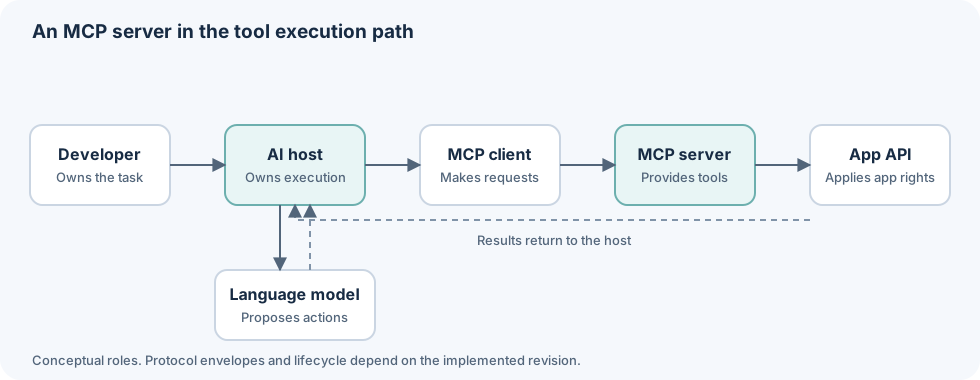
This is a conceptual diagram, not a revision-specific wire exchange. The model and application API are deliberately on different branches. A proposed tool call is a request for execution, and successful model output is not evidence that the API has performed it.
The protocol revision matters when you implement the exchange. The current official specification at the check date is 2026-07-28. It uses per-request metadata and discovery rather than the older initialization handshake. Earlier deployed hosts and SDKs can follow earlier revisions. See the specification guide before copying low-level request examples.
Local vs remote MCP servers
Local servers commonly use standard input/output, or stdio. The host starts a subprocess and exchanges protocol messages through its streams. That is useful for tools close to your workspace, but it also means executing code with the process permissions you provide. Installing a local integration deserves ordinary supply-chain and credential review.
Remote servers commonly use Streamable HTTP. The host reaches a service endpoint over the network. Authentication, authorization, transport security and availability belong to that deployment. Remote access can reduce local installation work, but it introduces a service you must trust with requests and possibly delegated access.
| Choice | Useful when | Responsibility to inspect |
|---|---|---|
| Local stdio | The tool needs local files or a developer-owned process | Package source, process permissions, environment secrets |
| Remote HTTP | Several clients need a maintained endpoint | Server operator, authorization flow, account scope |
| Internal remote service | Tools need company-private infrastructure | Network exposure, workload/user identity, operations |
Neither location is inherently safer. A local process can read files or launch other processes if permitted. A remote integration can disclose data to its operator or use excessive upstream scopes. The right boundary depends on the tool and the environment. The remote server guide covers hosted endpoint considerations.
Transport support is not interchangeable. An old configuration saying HTTP plus SSE may not work with a service that requires Streamable HTTP. Use current host instructions and the server’s declared requirements instead of changing URL suffixes until a connection succeeds.
MCP server examples
Examples make the boundary easier to see. A source-control tool can read an issue or propose a pull-request action. A document integration can retrieve a page. An incident integration can inspect an error. A calendar integration can list events or create a new one. The service account and individual operation determine the risk.
| Service example | Read-oriented task | Potential write decision |
|---|---|---|
| GitHub | Inspect issues and repository context | Decide whether issue creation is required |
| Notion | Retrieve a project document | Review changes before updating shared content |
| Sentry | Inspect an error record | Expose only necessary state-changing operations |
| Google Calendar | Read availability | Check destination account and event details |
These are service-level task examples, not an exhaustive promise that every upstream API operation appears in every connector. Inspect the current tool list in the selected integration. A logo in a catalog does not establish support for a particular field, filter or write operation.
Account selection is especially important when the same service appears twice. A personal calendar and a work calendar may have different privacy requirements. Giving an agent a “calendar tool” without an explicit account destination leaves too much unspecified. A narrow tool surface should make the intended account understandable before a write occurs.
Results also need review. A document can contain hostile instructions, and an incident record can include untrusted user input. Successful retrieval proves that the read occurred; it does not make the returned text authoritative instructions for the agent. Read MCP security for these trust boundaries.
MCP server vs MCP gateway
A server exposes a set of capabilities. A MCP gateway sits between clients and upstream capabilities to route access and apply a shared boundary. To the client it can itself appear as an MCP endpoint, so the terms describe different architectural responsibilities rather than incompatible protocols.
AIPx is a hosted example for developers connecting their own supported accounts. Each configured agent gets an endpoint such as https://dash.aipx.run/mcp/:agent. Rules attach to tool × account × agent, so two agents can receive different surfaces even when they use the same connected account.
The permission modes need precise interpretation. Allow and Confirm are execution hints. Confirm communicates approval intent through tool metadata, and review depends on whether the client honors it. Hide is enforced server-side and removes the tool from the agent surface. Do not interpret Confirm as a universal gateway approval gate.
Call records include the agent, tool, account, parameters, result and time. They help inspect access, but they do not necessarily contain the full model conversation, token spending or an end-to-end trace. The observability guide explains that distinction.
A gateway is useful when you need shared connection management and agent-specific policy. Direct access can be simpler for one trustworthy official server and one narrow task. Adding a gateway adds another operator and failure boundary; it cannot expand upstream account permissions or guarantee that allowed content is harmless.
How to add an MCP server to Claude, Cursor or Codex
First identify the host and the server transport. Then follow the host’s supported setup route. The configuration for a local command differs from a remote URL, and a desktop application’s UI differs from a CLI configuration file. Start with the Claude setup guide or the guide for your chosen host.
Use Claude or Claude Desktop guidance for the relevant application, Claude Code for its CLI workflow, Cursor for the editor, and Codex for that client. ChatGPT and other clients have their own compatibility considerations. Do not assume a configuration copied between products preserves transport or authorization behavior.
Start with one low-risk read. Inspect the destination account, returned data and record of the call. If the client cannot discover tools, check the endpoint, authentication, transport and revision support before broadening permissions. A connection failure is not a reason to supply a wider upstream token.
For writes, test approval behavior explicitly in your chosen host. A UI saying “confirm” can mean a client-side review prompt or merely metadata that another client ignores. Use a disposable account and verify what happens before relying on that hint for sensitive work.
If you are building a server, begin with a small stateless operation and the Python tutorial. Add account access only after you can validate inputs and inspect errors. For available implementations, use the server catalog and verify each project’s documentation rather than assuming every server uses the current protocol revision.
Further reading
glossary/mcp connector; ai agent security; mcp architecture; mcp clients; mcp vs tool calling; ai agent authentication; ai agent integrations; what is mcp; llm gateway vs mcp gateway; best ai agent tools; ai agent identity.
FAQ
What is an MCP server in AI?
It is a program or service that exposes capabilities through the Model Context Protocol. It supplies tools, resources or prompts to a client and does not need to contain a language model.
What is the difference between an MCP client and server?
The client makes protocol requests on behalf of the host. The server provides capabilities and executes permitted operations or returns content.
Do MCP servers run locally or remotely?
Both. Local servers commonly use stdio; remote services commonly use Streamable HTTP. Runtime location and transport are separate from the protocol role.
Does an MCP server need OAuth?
Not every server does. Remote authorization depends on the service, while local processes may use environment credentials or need no external credentials at all.
Can one agent use several MCP servers?
Yes, if its host supports them. A gateway can consolidate access, but each upstream service and account still needs an appropriate permission boundary.