What is MCP (Model Context Protocol)?
By AIPx team · Published 2026-10-14 · Updated 2026-10-14
MCP, or Model Context Protocol, is an open protocol for connecting AI applications to tools, data resources and reusable prompt templates. It gives a host a common interface for discovering and using capabilities supplied by external servers. It is not an AI model, a workflow engine or a guarantee that connected tools are safe.
This explanation follows official documentation checked on October 14, 2026. The current official revision is 2026-07-28, but individual clients, servers and gateways can implement earlier revisions or different optional capabilities. Compatibility needs to be checked for the actual products you connect.
What is Model Context Protocol?
An assistant usually needs information outside its model context. It may need a project issue, a calendar event or a current error report. A traditional integration translates those needs into provider-specific tool definitions and application-specific API handlers. The protocol standardizes part of that connection so a capability can be exposed to several compatible hosts.
The standard sits at an interface boundary. An upstream application still owns its objects, authentication and business rules. A model provider still owns its model API. The host chooses what context to supply and what proposed operation to execute. A shared interface reduces duplicated adapter work without merging those responsibilities.
A useful analogy is a common contract for calling external capabilities. The contract can tell you that an operation exists and which inputs it accepts. It does not tell you that your account may use it, that the operation is sensible for this task or that the returned content is trustworthy.
This distinction also explains why support varies. Saying an application “supports MCP” establishes a general integration route, not necessarily support for every primitive, transport, extension or authorization feature. Treat the exact capability list and version requirements as part of the integration contract.
How MCP works
The host connects to a server using a client component. It learns what capabilities the server provides and can request operations or content. The underlying messages use JSON-RPC, while transport determines how the messages move between processes or over the network. The official specification is the reference for message details.
In a typical tool flow, the host presents a relevant tool definition to the model. The model proposes a call. The host validates the proposal and authorizes execution, its client sends the request, and the server performs the permitted upstream action. The host then incorporates the result into the conversation or next step.
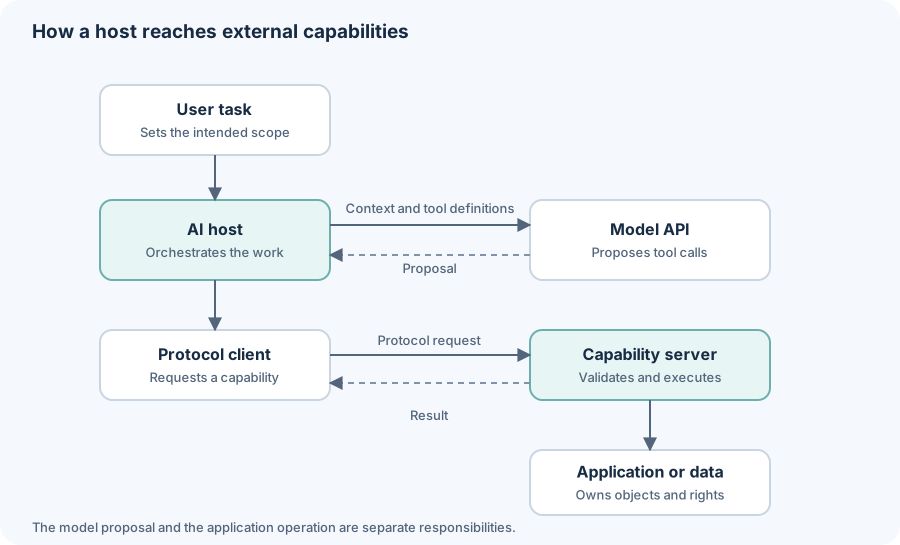
The diagram describes roles, not a wire-level handshake. It intentionally keeps the model proposal separate from the execution path. That separation is where validation, authorization, review and error handling can happen.
A tool call can fail even when the model selected the correct operation. The account may lack access, input may be invalid or the upstream service may be unavailable. The host should receive a meaningful result and decide whether to recover, ask for clarification or stop. Blindly repeating a write after a timeout can create duplicates.
MCP hosts, clients and servers
The host is the application the user interacts with, such as a coding assistant or editor. The client is the component speaking the protocol for that host. The server provides capabilities. A host commonly manages a client connection for each server it uses. See the architecture guide for the detailed topology.
| Term | Responsibility | Common confusion |
|---|---|---|
| Host | Conversation, model interaction and orchestration | A host can include several clients |
| Client | Requests and protocol interaction with a server | It need not contain its own model |
| Server | Capability definitions and permitted execution | It may wrap an existing API |
| Gateway | Shared routing and access boundary | It can present itself as a server endpoint |
| Transport | Carries messages | Local or remote does not define the server’s role |
Read what is an MCP server for concrete examples and MCP clients for host selection. A server may be a local subprocess or a remote service, and a gateway may route to several upstream systems while exposing one client-facing endpoint.
These roles remain useful even as revisions change. The current core has per-request metadata and server discovery; older implementations can use initialization and connection-scoped behavior. Avoid describing a sequence from an old SDK tutorial as universally current. The specification guide explains the revision boundary.
MCP tools, resources and prompts
Tools expose named operations with input schemas. Resources expose addressable content. Prompts expose reusable messages. The three primitives exist because the host can use an action, retrieve context or present a template in different ways.
A tool does not have to write. Looking up an issue can be a read-only tool because it is an operation selected with arguments. A resource can expose similar underlying data through an addressable URI. The design choice affects discovery and interaction, while security still depends on the actual data and action.
A prompt template can guide a review or summary, but obtaining it does not execute a workflow. The host determines how it is shown and used. Optional capabilities also mean that two hosts may present the same server’s resources or prompts differently.
Use the tools, resources and prompts comparison when designing a server. Choose the primitive for the interaction you want, then validate its implementation. A schema helps describe inputs; it does not authorize the caller or prove that a proposed action serves the user’s task.
MCP examples for developers
A coding assistant can retrieve GitHub issue context, a planning assistant can read Google Calendar availability, and a troubleshooting assistant can inspect Sentry records. Each combines a user task, an account grant and a specific operation. The connector is a means of access, not an instruction to expose every possible action.
Suppose the developer has a personal account and a work account on the same service. One agent may need only the work project’s issue reads; another may need to propose a personal calendar event. Account identity should be explicit before execution. A generic tool name without a clear destination is insufficient for a sensitive write.
The supported integration catalog is the starting point for AIPx. Check the current tool list rather than assuming that any upstream API action is available. For an internal API with only a few operations, custom handlers can be simpler than a broad integration platform.
A remote server can provide a maintained endpoint without local process setup. A local stdio server can be useful close to a workspace but requires executing code on the developer’s machine. Review the operator or package in either case. A directory helps discover options; the server catalog does not replace credential and code review.
MCP security and permissions
Tool metadata and returned content are external input. A document can contain instructions intended to redirect the assistant, while a tool description can influence which operation it selects. Successful authentication does not make those instructions safe. Read MCP security and AI agent security for concrete controls.
Use narrow upstream permissions and expose only the operations the task needs. Separate credential storage from model context. A caller’s token should be validated for the intended service, and an upstream API token should not be treated as a substitute for authenticating the client. The authentication guide and identity guide explain these separate layers.
AIPx provides a hosted MCP gateway over supported connected accounts. Rules attach to tool × account × agent. Allow and Confirm are execution hints, with review dependent on the client honoring approval metadata. Hide is enforced server-side and removes the tool from the agent surface. Test the actual host before relying on review for a write.
Audit records can help inspect which account and operation an agent used. They do not automatically contain model reasoning, full conversations or provider spending. The observability guide distinguishes call records from complete traces. A gateway also cannot guarantee that allowed read results will never disclose data through another channel.
MCP vs APIs and function calling
An API exposes an application service. Model function calling describes how a model proposes a structured operation to its executor. The protocol provides a reusable interface through which a host can discover and invoke external capabilities. These layers can work together rather than replace one another.
If one application has three custom tools, direct API handlers and model tool definitions may be sufficient. A reusable server becomes attractive when several hosts need the same capability and you want a common interface. Read tool calling vs MCP before adding a protocol layer simply because it is popular.
A model gateway has another job: routing or observing model API requests. It may help with provider access and inference traffic while a tool gateway manages account operations. The LLM gateway comparison explains why an agent can need both without either replacing the other.
For integration options, compare AI agent integrations and the agent tools guide. Choose the narrowest approach that supports the required operations and makes ownership clear.
How to start using MCP
Pick one host and one low-risk task. Follow the relevant setup guide for Claude, Claude Desktop, Claude Code, Cursor or Codex. ChatGPT and other clients need their own compatibility checks.
Connect only the required account, inspect the visible tool list and try a harmless read. Then test an invalid input or denied operation. This gives you evidence about execution and error behavior before a write touches real data. Add review and account rules according to the actual client behavior rather than a generic permission label.
When building your own capability, start with the minimal Python server tutorial. Keep the first operation stateless and credential-free. Once you can inspect its schema and verify its result, add the upstream service boundary deliberately, with validation, access checks and recovery behavior.
FAQ
What is MCP in AI?
MCP is the Model Context Protocol, an open interface for connecting AI hosts to tools, resources and prompt templates supplied by external servers.
Is MCP an Anthropic-only protocol?
No. It is an open protocol used across multiple vendors and applications. Exact feature and revision support still varies by implementation.
Is MCP an API?
It is a standardized protocol interface. A server commonly wraps an existing application API and exposes selected capabilities through that interface.
Does MCP make tools secure?
No. Authentication, upstream scopes, server validation, host policy and gateway enforcement remain necessary. Retrieved content and tool metadata can be untrusted.
Can I use MCP without building a server?
Yes. Connect a compatible host to an existing server or gateway, after checking its transport, authorization requirements and actual tool capabilities.